Adobe Community

- Home
- InDesign
- Discussions
- Background missing when exporting from indesign to...
- Background missing when exporting from indesign to...

Copy link to clipboard
Copied
Sometimes when I export a file from indesign to pdf, my background doesn't show up. The background is just a block of solid colour, or gradient. The background block of colour is usually the full size of the page. I've tried to play around to see what is causing this to happen and sometimes if I reduce the size of the block to say, 1/3 of the page then the block of colour shows up, but then when I make it the full size of the page as I actually need it to be, the colour block doesn't show up when I export it to pdf (i've tried all the different pdf presets and it doesn't make a difference)??? Does anyone know why and how to fix it?
thanks!


 1 Correct answer

Check your Acrobat preferences: Edit>Preferences, then click Accessibility and make sure "Replace Document Colors" is NOT checked.


 32
Replies
32
32
Replies
32


Copy link to clipboard
Copied
I see nobody has had any ideas yet. Maybe I can get the ball rolling.
Do you get any error or warning messages during the export? What settings are you using? Have you tried any of the other presets?
Is the background visible when you go to Preview mode or use Overprint Preview in ID?
What version of ID are you using? Is it fully patched? What is your OS?

Copy link to clipboard
Copied
I have seen this plenty of times in the past, I think up to CS4, definitely CS3. When I had a very basic page with an overall coloured background made with a rectangle bleeding off all four sides, sometimes it would not appear at all in PDF. I found that the program is not clear about which page the object belongs to and would assign it to a neighbouring page where it was actually out of sight to that page.
As more items were added to the page, it was as though the item would interact somehow with those items and suddenly start appearing, so I would put hidden items behind the missing object and that seemed to help.
I have a strong feeling that this stopped happening part way through CS4, so maybe there was an update that improved the behaviour, you could try updating or putting more things on the page. Or start drawing the rectangle on the desired page and then drag edges to make the bleed to ensure that it is still attached to the appropriate page.
Copy link to clipboard
Copied
Hi,
I've just noticed this. When i open the pdf it seems like the background is missing. I tried splitting up the background in 2 rectangles of the same colour that overlap a bit and then it seems to work (sometimes - but it's inconsistent. ) so maybe p taz's suggestion that adding more items to the page somehow makes things appear.
BUT I only now tried this! ... It seems that when i send it to print, the background is actually there. So I guess that's a relief. It just doesn't show up on screen in the pdf. The problem is that if I send it to a client to review, he's going to open the file and see nothing.
BTW, I don't get any error warnings, I've tried making the pdf with all the standard presets (e.g.high quality, pdf/x1a, press quality), I'm still using CS3, it doesn't show in overprint or preview mode.
Copy link to clipboard
Copied
jacq_vyr wrote:
... it doesn't show in overprint or preview mode.
Are you saying that in ID it disappears in overprint or Preview mode, or that it still doesn't appear on screen in the PDF?
If you don't see it in ID in those modes it means it's set not to print.
Copy link to clipboard
Copied
I experienced the inconsistent appearance too, it was dependent on how the subsequent app was using it, if there was an adjoining page with the missing part 'hanging off', it would be visible on the desired page but still seemed to be part of the neighbouring page but when viewing the single page alone it would not be there, of course...
Sorry I can't give examples, I have not seen it in a while, as I said, I expect an update has ended it.
Copy link to clipboard
Copied
I meant it doesn't show in acrobat's overprint preview or output preview mode, even though it seems to print. It always shows in ID.
Copy link to clipboard
Copied
Agree...the preview modes seem to be single page mode where the neighbour is ignored and the print RIP and InDesign main mode are 'spread' views where the distant item is valid.


Copy link to clipboard
Copied
If possible, can you provide us with the sample indd file where you are encountering this problem?
Copy link to clipboard
Copied
sure. i've run across this making a pdf from an illustrator file (using distiller) as well so I'm thinking maybe it's not an ID problem but an acrobat problem (i had originally posted this question on the acrobat forum)? as i said before, the background seems to be there when you print, but it just doesn't show up when you open the file on screen.
Copy link to clipboard
Copied
sure. i've run across this making a pdf from an illustrator file
(using distiller) as well so I'm thinking maybe it's not an ID problem
but an acrobat problem (i had originally posted this question on the
acrobat forum)? as i said before, the background seems to be there
when you print, but it just doesn't show up when you open the file on
screen.

Copy link to clipboard
Copied
I have been pulling my hair out on this problem as well. I am using CS4 ID and Acrobat Pro 9. I originally thought it was an ID EXPORT problem. But now I think it is some DISPLAY problem in Acrobat.
I work for a magazine and we are constantly making ID files into PDFs and sending them to press. This problem has shown up for me in the last few months. I believe related to an update or some settings of Acrobat. I have a coworker who is using the same software as me and DOES NOT have these issues when looking at the same files.
EXAMPLE:
here is a tester ID file I made with a CMYK gray background and some text on top:
http://ccie-media.s3.amazonaws.com/downloads/acrobat_problem/background_test.indd
Here is the PDF EXPORT SETTINGS:
http://ccie-media.s3.amazonaws.com/downloads/acrobat_problem/export_summary.txt
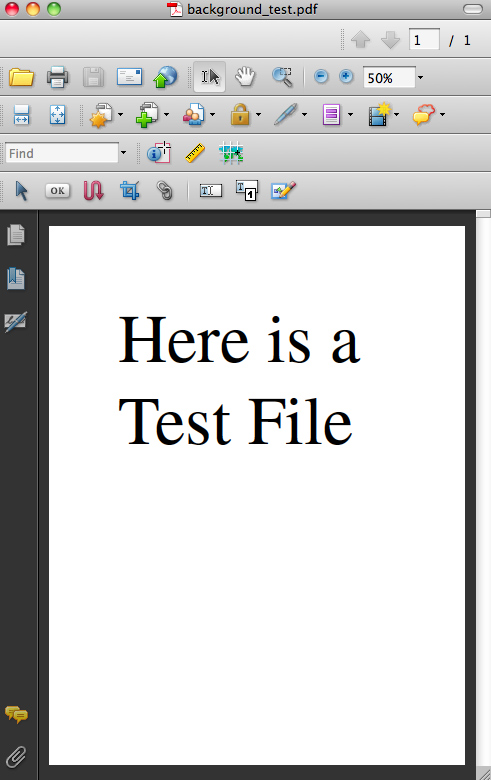
Here is the PDF that I made (that likely looks correct on your machine. It looks correct on my coworker's macbook)
http://ccie-media.s3.amazonaws.com/downloads/acrobat_problem/background_test.pdf
Here is a JPEG of what I see on my screen (macbook pro circa 2008 running 10.6.3)
http://ccie-media.s3.amazonaws.com/downloads/acrobat_problem/background_test.jpg
Here is the OUTPUT dialog JPEG- my Acrobat does not recognize any background color in any plates... even when I run the crosshairs over the background to get percentages of color... all 0%)
http://ccie-media.s3.amazonaws.com/downloads/acrobat_problem/background_output.jpg
When I print this PDF out on a printer- the background is there. When I send to other people the background is there. I believe the PDF file is fine... but it is an ACROBAT display issue that I am missing... like FAST WEB VIEWING or some weird thing like that. Let me know if you have any insights
Thanks

Copy link to clipboard
Copied
In this checked in your Acrobat preferences. It is a user setting so you can't force it on anyone.

Copy link to clipboard
Copied
Your links don't seem to be working....
Screen captures can be embedded using the camera icon:

Does your background show in ID whe you go to Overprint Preview?
Copy link to clipboard
Copied
YES- the Show Large Images box is checked - although I suspect it something like this... headache box is clicked.
Links - sorry- something is up with my Amazon S3 permissions
Here is all of the above files in a ZIP (1.2MB):
http://www.ccie.com/scott/background_problem.zip
YES - background shows up in ID with overprint preview and in every other viewing option that I can find in ID. The problem shows up in the PDF.
Copy link to clipboard
Copied
Everything looks just peachy (or should I say gray?) here.
When was the last time you did a general cache cleaning on your Mac?
Copy link to clipboard
Copied
No - I can't say that I have ever on this machine. What is the preferred way to do this ? Trash my library cache folder ?
Copy link to clipboard
Copied
I'm not a Mac user, but I think most would recommend running a utility like Cocktail.

Copy link to clipboard
Copied
I have CS5 and I am having the same problem. Except even when I try to print directly from the PSD I still get no background color
Copy link to clipboard
Copied
Seamisti wrote:
...when I try to print directly from the PSD I still get no background color
Are you working in Photoshop or InDesign? This is the InDesign forum...

Copy link to clipboard
Copied
Hi,
I am having this same problem right now (2013) and trying to find a way to solve it. I have never had this issue in the past. The example file i am working on is a document that prior to now had no issue exporting the black box in the background. Its not just black as I have tried normal black, rich black, red etc.
I am working in CS5.5 with all software up to date.
I have tried saving the file as an IDML and reopening to see if it will 'debug' the file. I have exported the PDF as every kind of option. I have restarted the computer and the program several times.
Similar to the above replies, reducing the size of the box to something small fixes the issue. But obviously doesnt solve the problem as when you go back to a large box it disappears again. On a few tests, putting a different black box underneath the large one has made it show up, however this is not consistent as testing it a second time produced a different result.
I have also just tested this issue in a new file sent to me by a client. They sent me an Indesign file and a PDF (exported at their end) and my Acrobat does not show up the black background or a photo sitting on top of this. The whole page is just blank when viewing in Acrobat.
Copy link to clipboard
Copied
Let's confine the answers to your other thread... http://forums.adobe.com/message/5491551
Copy link to clipboard
Copied
Check your Acrobat preferences: Edit>Preferences, then click Accessibility and make sure "Replace Document Colors" is NOT checked.

Copy link to clipboard
Copied
Changing this setting worked for me. I'm using Acrobat CC and it was still a problem. What's strange is that we have 4 licenses and for some reason, the settings were different.
Thanks!!

Copy link to clipboard
Copied
Even though this might be a solution for various situations, it is not the ultimate one. I have for example the same settings on my work desktop from previous user, and I was not aware of it. I understand why is it like that, but if anyone is sending interactive PDF exports to different ppl (like me), it is always better to add background as an image (jpg), so even with these Acrobat settings the background will appear like intended with very small increase of size instead (almost not noticable) of using IDD color block. I really don't like when the receiver can unintentionaly "change" the readability of my document.

-
- 1
- 2

 AdChoices