 Adobe Community

- Home
- Acrobat Reader
- Discussions
- Enable PDF toolbar by default in IE/Firefox?
- Enable PDF toolbar by default in IE/Firefox?

Copy link to clipboard
Copied
At some point since Adobe Reader ascended to version 10, the display of the toolbar within our web browsers appears to be turned off by default. Is there a way to change the default back to toolbar-turned-on?
Firefox 5, IE7 (I have local issues that preclude upgrading IE), Reader 10.1.
Other settings or specs on reply.


 1 Correct answer

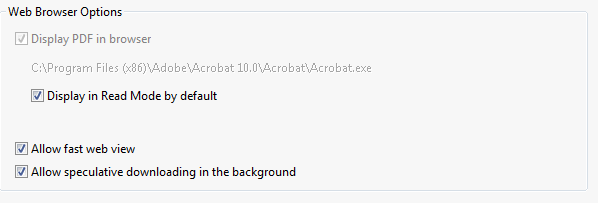
In the Internet Preference, turn OFF "Display in Read Mode by default".

 13
Replies
13
13
Replies
13


Copy link to clipboard
Copied
Pressing F8 will toggle the toolbar on or off in either browser. Firefox should save whatever you set it to, displayed or not displayed. IE should too but since I hardly ever use it myself I can't speak accurately to that. It should save the setting though like Firefox does.
Copy link to clipboard
Copied
Nope, it doesn't remember the settings at all.
Have to hit F8 EVERY time.

Copy link to clipboard
Copied
In version 10.1 of Acrobat and Adobe Reader, the toolbar is hidden by default when viewing PDFs in a browser plugin window, even if you set your preference otherwise. It's a known issue and will be addressed as soon as possible.
Copy link to clipboard
Copied
That's interesting to know Dave. I'll keep it in mind for future posts.
Funny thing though. I use FF 5 beta, FF6 "Aurora" and IE9 and PDFs always open with the toolbar enabled.
I'm involved in a criminal case (not the defendant, thankfully) and have been viewing/downloading statutes since December in both browsers, but mostly Firefox, and I always have the bar to click when I need to save something.

Copy link to clipboard
Copied
Has anyone found a solution for this yet? Acrobat X add-on doesn't show up in either FireFox or IE9... Although FireFox acknowleges that the add-on is not compatible.
Drew

Copy link to clipboard
Copied
Alt-F8 resets the toolbar.

Copy link to clipboard
Copied
In the Internet Preference, turn OFF "Display in Read Mode by default".

Copy link to clipboard
Copied
Yes!! That worked on Version X, however on Version 9 that option isn't available. My answer was more directed toward Version 9. Thanks for the correction! 
Copy link to clipboard
Copied
so, are you saying to uncheck the "Display in Read Mode by default", within Acrobat Pro X? Then what needs to happen? What do I need to do in IE?
Copy link to clipboard
Copied
I found that after unchecking "Display in Read Mode by Default", I had to go back into "Adobe Reader" program then go to Preferences and "Uncheck" Display PDF in browser. Then open up a PDF in an IE window, when it opens up a Adobe Reader then go back again to Preferences and "Check" Display PDF in browser. Close Adobe then refresh your browser window to redisplay the PDF and the toolbar should reappear. Hope this makes sense.
Copy link to clipboard
Copied
I think I'll have to completely start over... it's not working for me...
thanks.

Copy link to clipboard
Copied
Hi,
you can also try to adjust the mentioned behaviour by adding/modfying the following Reg key:
[HKEY_CURRENT_USER\Software\Adobe\Acrobat Reader\10.0\AVGeneral]
“bBrowserDisplayInReadMode”=dword:00000000
If you need to have the same for Adobe Acrobat X.x.x as well just do the same to this key:
[HKEY_CURRENT_USER\Software\Adobe\Adobe Acrobat\10.0\AVGeneral]
“bBrowserDisplayInReadMode”=dword:00000000
Regards,
Norbert
Copy link to clipboard
Copied
What is the obession with removing all the UI elements? i have 24" inch monitor and 1920x1200 resolution like millions of other people and all these software companies want to do is remove all the ui elements. Its ridiculous. What could possibly be the justification for removing the navigation toolbar? don't say more screen space, its bloody nav toolbar.... helloooo this is a main aspect of the software and you think its time to remove it by default? Is there some obsession with these browser designers to remove all the ui elements?
Not only that, if you go to show navigation pane buttons. Then the floating toolbar (that is also annoying) fails to come up anymore and you can't even remove the navigation button bar which pops up on the left. Not to mention every single time i open a pdf i now have to press f8.
Who thinks of this?


 AdChoices