 Adobe Community

- Home
- Flash Player (read-only)
- Discussions
- Cannot install Flash Player Windows 7 x64 - Applic...
- Cannot install Flash Player Windows 7 x64 - Applic...

Copy link to clipboard
Copied
I cannot install or update flash player on my windows 7 x64. It seems the applications is blocked by the system. I have read a few solutions but nothing works. I have log a bug but no replies yet.
https://bugbase.adobe.com/index.cfm?event=bug&id=3176922
anyone can help?
Thanks


 1 Correct answer


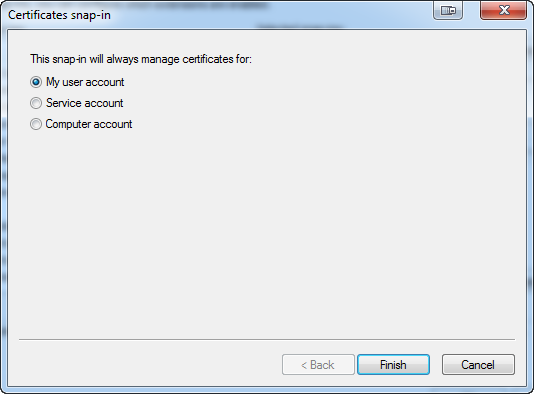
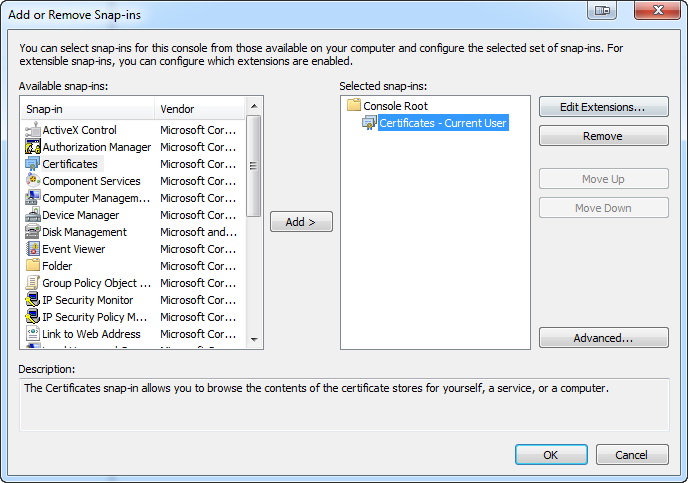
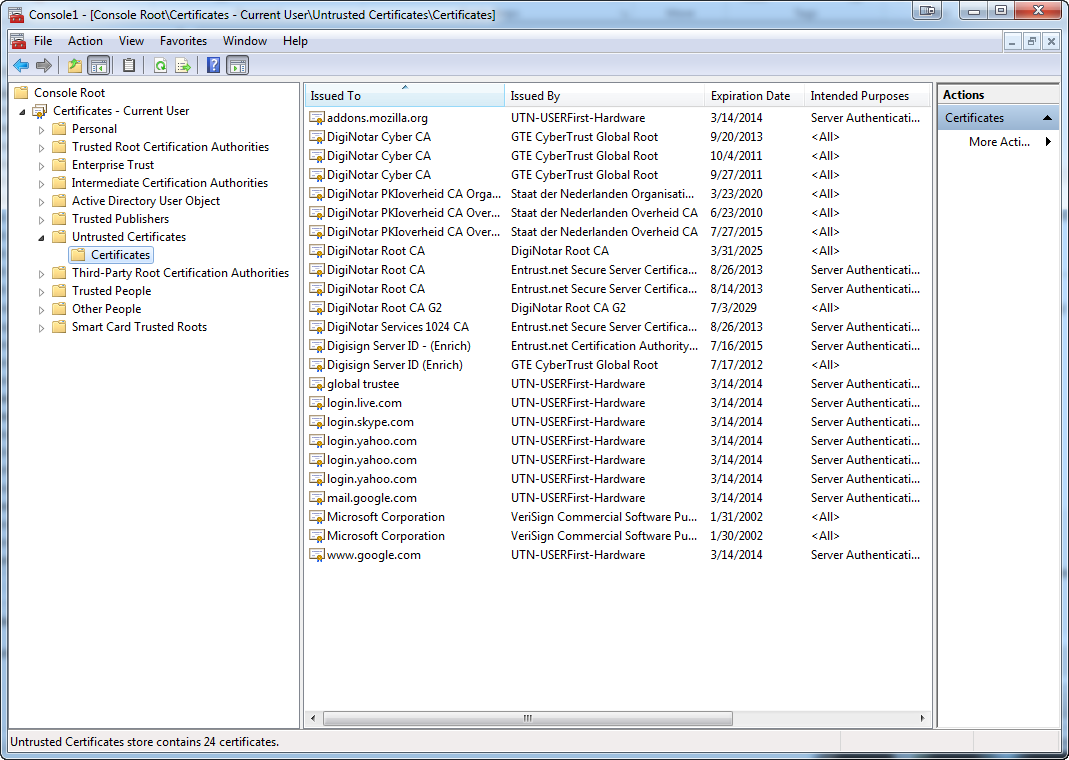
Here's some screenshots from my system. In particular, I think you'll want to use your user account instead of Adobe LM. The last screenshot is the one you want to review.

 16
Replies
16
16
Replies
16


Copy link to clipboard
Copied
Download the file(s) you need, disconnect from the Internet and run the file(s).

Copy link to clipboard
Copied
If Carl's download links do not solve your problem, can you be a little bit more specific what "cannot" means; what exactly happens when you try to install?
Copy link to clipboard
Copied
Not sure if you cannot access to the bug (link) I added in my original message. Everything was explained there so I did not want to explain again.
I have adobe V10.x installed in my computer. Windows 7 x64. I use firefox not IE. When I receive the notification to update flash player and after downloading the update...a message popup saying the application has been blocked.
If I try to go the web page - downloads and try to install the last version install_flashplayer11x64_mssd_aih.exe, a similar message is showed...
The message is something like this:
"This program has been blocked for your protection"
I tried to unblocked the downloaded file but the message still there, I have also changed the security level of my account (admin) to the minimum but nothing works... Tried to run as administrator...nothing...
Any ideas?
Copy link to clipboard
Copied
Try downloading the offline installer from http://helpx.adobe.com/flash-player/kb/installation-problems-flash-player-windows.html#Install_in_a_...
If you still get this message, can you post a screenshot of it?
What antivirus software are you running?
Copy link to clipboard
Copied
I will try to install that when back at home later on...
I cannot get any screenshot as the popup message is in modal windows...print screen has no effect...
I don't think antivirus is causing that error...it looks like a windows security problem...but anyway is panda online.
The error message is like this...(taken from google images)
Copy link to clipboard
Copied
You need to use the camera icon in the forum editor to attach an image.
Copy link to clipboard
Copied
P.S. you can use the Windows 7 Snipping Tool to obtain a screenshot.
Copy link to clipboard
Copied
Copy link to clipboard
Copied
Impossible....still the same
The link you told me before for the offline installation was the same I was using...I tried the firefox version as Firefox is the browser I am using... The link points me to a a new page where I download the file. Once the file is in my computer, I unblock the file (as usually files are blocked by windows 7), mark "run as administrator" and execute the file...and the message appears!!!
I cannot get an screenshot even with that application you mention because once I run the application and the message is showed, the rest of the screen except the message become dark....the message is in a modal window (not sure if you know what I mean)...everything behind the message, the rest of the screen is disabled...so cannot run any other application or focus on any other...just click close!
any ideas?
Copy link to clipboard
Copied
Could you review the Local Security Policy application (type "local security policy" in your start menu search bar"), specifically the "Software Restriction Policies" section and verify that Adobe is allowed in your trusted publishers?

Copy link to clipboard
Copied
My windows version is home premium so I have no access to that application
Copy link to clipboard
Copied
Ok, hmm. Try typing in "MMC" in your start button's search field. Hopefully mmc.exe will appear. Launch that application. Next, click the menu item File->Add/Remove Snap-in...
Add the certificates snap-in to the list of selected snap-ins. My system asked me if I wanted to use use, service, or computer accounts. I went with My user account, but you might need to try different options. Click OK.
Hopefully you see "Certificates - Current User" listed. Expand that and then double click on "untrusted certificates". Do you see Adobe listed in there?
Copy link to clipboard
Copied
Still not working... I did what you said...and I can see the certificate for Adobe LM Service...but after that the error still happenning...
(Spanish versio of windows - hope you can understand anyway)

Copy link to clipboard
Copied
forgot to say I had to select "Certificates" then "Service Account" and then "Local Machine" and then in the list..."Adobe LM"
Copy link to clipboard
Copied
Here's some screenshots from my system. In particular, I think you'll want to use your user account instead of Adobe LM. The last screenshot is the one you want to review.


Copy link to clipboard
Copied
Brilliant...that's it...it's work... I could find the blocked Adobe certificate and transfer it to trusted ones...
You cannot imagine how much time I spent trying to fix this by myself and searching on google....
THANKS

 AdChoices