 Adobe Community

- Home
- Flash Player (read-only)
- Discussions
- Flash Player 11.2.202.235, IE9 64-bit, Windows 7 6...
- Flash Player 11.2.202.235, IE9 64-bit, Windows 7 6...

Copy link to clipboard
Copied
Flash Player 11.2.202.235, Internet Explorer 9 64-bit, Windows 7 64-bit, HP laptop - Flash objects do not display properly in browser; right-click Settings window does not display properly either; i have to scroll down and back up to see parts of the Flash object but it disappears anyway when i mouse over.
I took video of the issue and have now linked to it. In the video, I show two browser tabs - one from this site and one from a Bank of America (BoA) site with a flash object. You can see how the BoA flash object disappears when I make that tab active.
Please help!
Link to video:
http://www.youtube.com/watch?v=PCLJcxmzPkI&feature=youtu.be
Message was edited by: Jleon21612012


 1 Correct answer
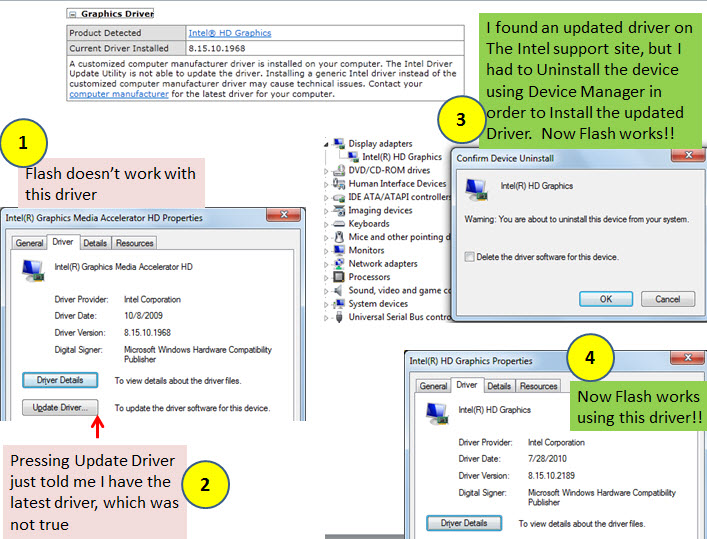
It worked and the problem is fixed! Thanks Pat. You are brilliant!
I documented my journey in the image below - in case it helps others with this issue.
Basically, I had to uninstall the device using device manager before it would let me install the updated driver.

 7
Replies
7
7
Replies
7


Copy link to clipboard
Copied
Thank you for providing so many details in your initial post.
This looks like a display adapter driver issue to me; can you check if an updated device driver corrects the situation? See http://forums.adobe.com/thread/945765
Copy link to clipboard
Copied
Thanks for the reply and the link. The driver update did not work because it says I have the latest one installed - even though the driver date is 10/8/2009. It's the Intel(R) Graphics Media Accelerator HD, version 8.15.10.1968.
Can you believe that...the latest is from 2009?! I tried to install an updated version anyway - first by going to the Intel site. I found a driver update from Jan 2012 that matches my system, but the install aborts with the error message "A customized computer manufacturer driver is installed on your computer. The Intel Driver Update Utility is not able to update the driver."
So, I searched through the HP support site and finally found a link to my computer:
http://h10025.www1.hp.com/ewfrf/wc/product?product=4121236&lc=en&cc=us&dlc=en&task=&lang=en&cc=us
And I downloaded and installed the "same" driver anyway:
| Intel Graphics Media Accelerator HD Driver ► | ||
| 2009-12-04 , Version:8.15.10.1968 B, 29.91M | ||
| This package contains the driver for the Intel Graphics Media Accelerator HD in the supported notebook/laptop models. |
But it does not correct the problem.
Maybe this problem is because of an old graphics driver - but this is apparently a dead end for me.
Is there any possibility it is caused by something else?
Copy link to clipboard
Copied
Sometimes manufacturers modify original drivers, and then prevent installation of non-modified drivers. Sometimes that is not so bad, as to prevent inexperienced users from tampering with their computers.
However, other times we really do need newer drivers, e.g. to get new software (e.g. Flash Player) to work properly.
What I would do if I were in your situation is to download and install DriverMax - I have used it successfully for many years. Use the free version that allows up to two driver downloads per day.
But don't get carried away; only download & install the graphics driver. Let DriverMax make a System Restore Point before the installation, so that you can easily go back if something does not work right.
Hope this will solve your problem!
Copy link to clipboard
Copied
Hi. I installed Driver Max (even paid the $29.97 for a registered version). This ia a very easy tool.
I ran the scan and it wants to install an updated graphics driver, but the same thing happens. The update aborts.
How do you force the driver to update using Driver Max?
Copy link to clipboard
Copied
It worked and the problem is fixed! Thanks Pat. You are brilliant!
I documented my journey in the image below - in case it helps others with this issue.
Basically, I had to uninstall the device using device manager before it would let me install the updated driver.

Copy link to clipboard
Copied
Congratulations; I think you are the brilliant one!
B.t.w. my Intel HD graphics driver is 9.17.10.2729, but I don't think you need to bother, as long as everything work on your system.


Copy link to clipboard
Copied
Excellent job detailing the problem and solution!

 AdChoices